What is in the report?

Seven A4 pages, charts first. These are from the sample report for a fictional client, Alex.
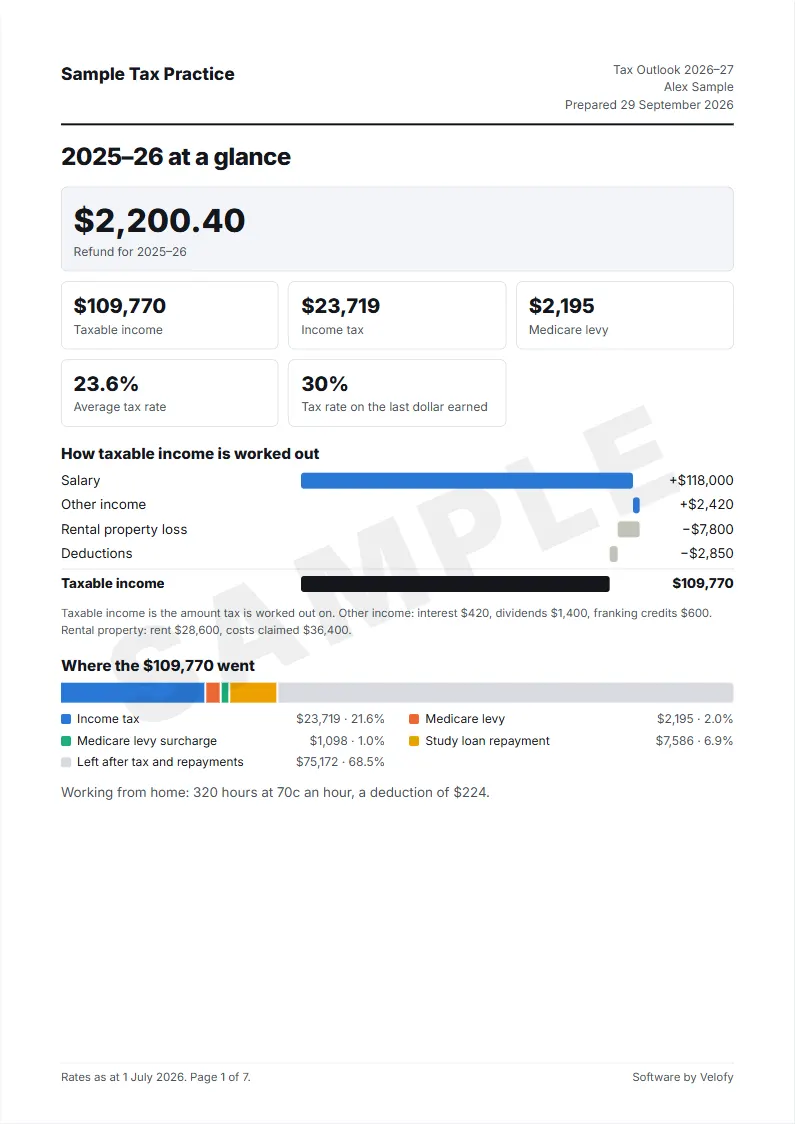
  1. 2025–26 at a glance The refund or tax payable, how taxable income was worked out, and where the income went.
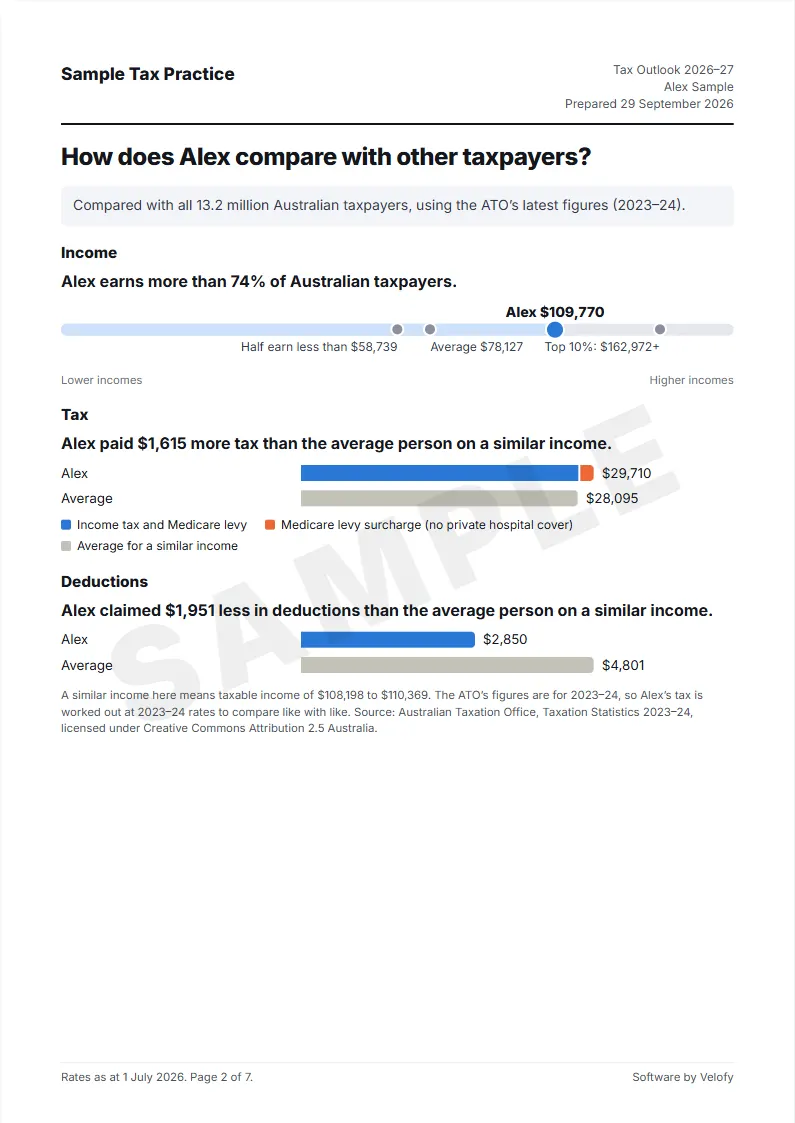
  2. How does Alex compare with other taxpayers? Where the income sits among all Australian taxpayers, and the tax and deductions against the average at a similar income. From the ATO’s taxation statistics.
  3. How does Alex compare with people on a similar income? How many people on a similar income have hospital cover, a rental property or a study loan, where the super balance sits, and any unused super cap.
  4. What does 2026–27 look like? The same figures at 2026–27 rates, the assumptions behind the estimate, and where the tax goes in the Budget.
  5. What if… What a rental loss does to the tax and, for a client paying the surcharge, the surcharge against the cheapest hospital cover in the state.
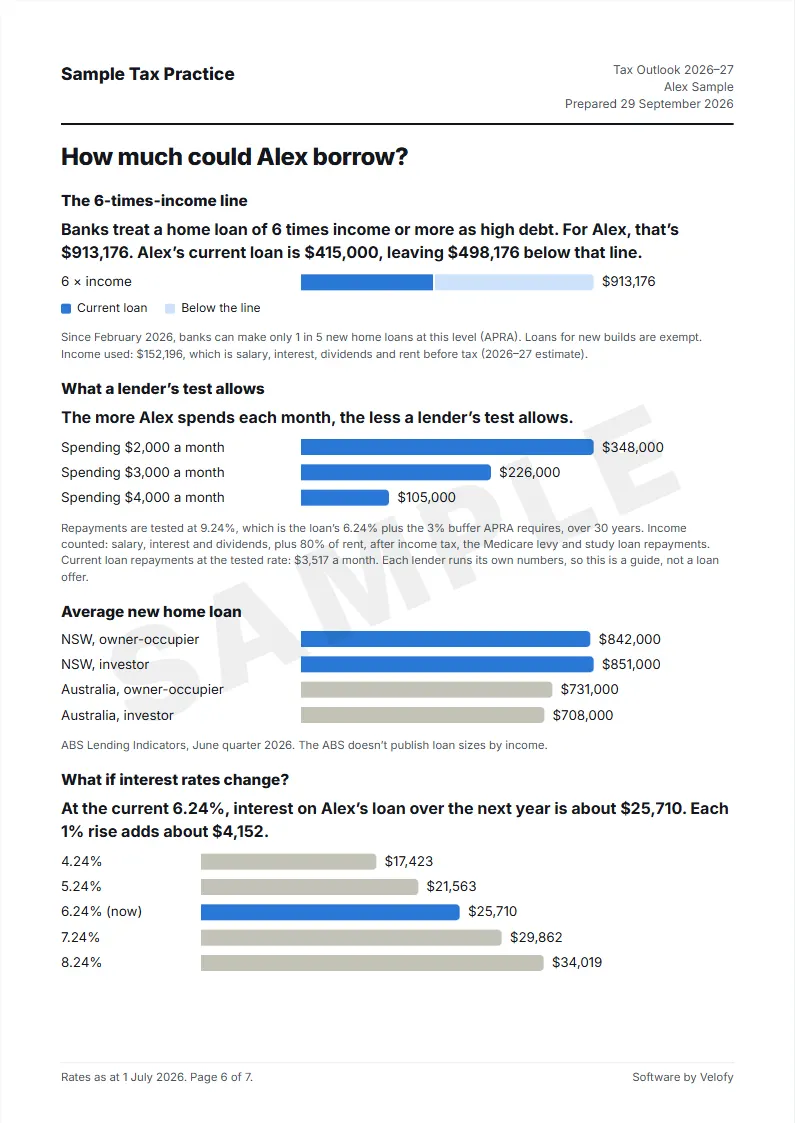
  6. How much could Alex borrow? The six-times-income line, a lender’s serviceability test, the average new home loan, and, when a loan is entered, interest at different rates.
  7. Tax rates and thresholds for 2026–27 The brackets, where the client sits against each threshold, and the key dates.

From the notice of assessment to a PDF

1

Enter the 2025–26 figures

From the return and the notice of assessment. Blank sections drop out of the report.

2

Check against the assessment

The report is made only when the worked-out result is within $1 of the assessment.

3

Save as PDF

Your firm’s name on every page. Read it through, then send it with the return.

Where do the figures go? Nowhere. The report is worked out in your browser and the PDF is made by your browser. Velofy has no copy of any client’s figures.

What does it cost?

Free

$0

  • 5 reports a week
  • All seven pages
  • “Software by Velofy” on each page
  • Your firm’s name, no logo
Start free

Professional

$249 a year

  • Everything in Standard
  • Save each client to a file on your computer
  • Open the file next year and start from last year’s figures

Payment opens soon. Start on the free plan meanwhile.

Prices in Australian dollars, billed yearly. Paid plans renew each year until cancelled; cancel any time from Manage plan in Tax Outlook. Payment is taken by Stripe, and your licence key appears straight after. Refunds within 14 days of any payment: email . Terms · Privacy

Tax Outlook questions

Is the report financial advice?

No. Every sentence in the report is a figure, a date or what the law says. It makes no suggestions. You read every page before it goes to the client, and the report carries the statement tax agents give under the Corporations Regulations.

Where do the client’s figures go?

Nowhere. The report is worked out and laid out in your browser, and the PDF comes from your browser’s print dialog. There is no client database. Paid plans send only the licence key to Velofy, to check it.

Which figures do I need?

The 2025–26 return and notice of assessment: salary and tax withheld, interest, dividends and franking credits, capital gains, total deductions, rental income and costs, study loan balance, hospital cover, and any home loan. Rental and loan sections drop out when they are blank.

What if the figures do not match the assessment?

The report is only made when the worked-out 2025–26 result is within $1 of the notice of assessment. If it is not, Tax Outlook shows both figures and lists what it does not work out, such as the seniors offset, zone offset and foreign income. You can enter one line for other offsets and adjustments, and it prints on page 1.

Which rates does it use?

2025–26 rates for the year just lodged and 2026–27 rates for the outlook, including the 15% rate on income from $18,201 to $45,000 and the $1,000 standard deduction for work expenses. The last page lists every rate and threshold used, and each page shows the date the rates were checked.

How does the free plan’s weekly limit work?

Five different clients in any 7 days. Rebuilding a report for a client already counted that week does not use another one, and the sample client never counts.

How do renewals and cancelling work?

Paid plans are billed once a year and renew each year until cancelled. Cancel, switch between Standard and Professional, or update the card any time from Manage plan in Tax Outlook. After cancelling, the plan runs to the end of the year already paid, then reports go back to the free plan.

Can the whole firm use one licence?

Yes, within one firm. Enter the key on each computer that makes reports.

Tax Outlook is software for tax practices. Velofy does not provide tax or financial advice and does not review reports made with it.